HML Visual Dictionary
Overview
The HML Visual Dictionary defines the shared visual notation used throughout HML diagrams.
The goal is to make HML diagrams consistent, reusable, and easy to update. Whenever a symbol is represented by an icon, the documentation references a shared SVG file under:
static/img/hml/
This means that if an icon changes later, the documentation pages that reference it will automatically show the updated symbol.
Core visual principles:
- HIFs flow primarily from left to right.
- Semantic Cells process HIFs.
- Policies enter Semantic Cells from above.
- Semantic Operators enter Semantic Cells from above as clean
λsymbols. - Memory, cache, state, and queues appear as explicit supporting structures.
- Decision branches are shown using diamonds.
- Specialized experts such as NN, LLM, and multimodal models use dedicated icons.
Core Visual Grammar
A standard HML processing cell follows this visual grammar:
The policy and expert enter independently from above. The policy does not flow through the expert, and the expert does not define the policy. The Semantic Cell binds both to the HIF flow.
Symbol Reference
The following table defines the main HML visual symbols.
| Symbol | Concept | Meaning | SVG Asset |
|---|---|---|---|
| λ | Semantic Operator | Expert, heuristic, model, policy function, or implementation binding | text / inline SVG |
 | Policy | Rules, thresholds, constraints, social laws, safety policies | policy-check.svg |
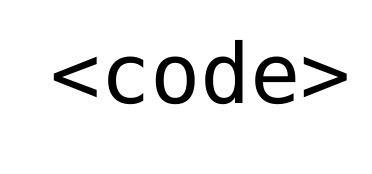 | Deterministic Code | Rule-based or procedural logic | code-expert.svg |
 | Neural Network | Learned model, classifier, perception model, or predictor | nn-expert.svg |
 | LLM | Language model or generative semantic reasoner | llm-bubble.svg |
 | Multimodal Model | VLM or multimodal model for cross-modal reasoning | multimodal-expert.svg |
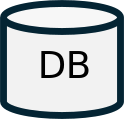 | HRI_DB | Persistent semantic world model of the robot | hri-db.svg |
 | Semantic Cache | Reusable semantic computation or interpretation store | semantic-cache.svg |
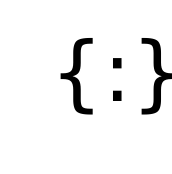 | Semantic Object | JSON-like structured semantic data | semantic-object.svg |
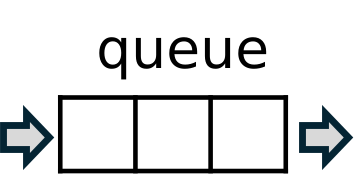 | Queue | Ordered waiting items | queue.svg |
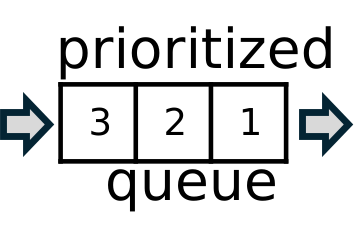 | Prioritized Queue | Queue governed by a priority policy | prioritized-queue.svg |
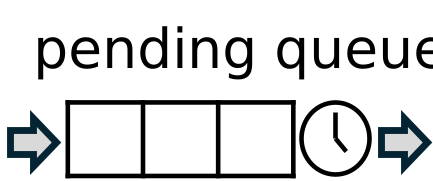 | Pending Queue | Waiting tasks or requests that cannot execute yet | pending-queue.svg |
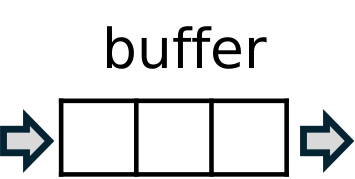 | Buffer | Bounded temporary storage | buffer.svg |
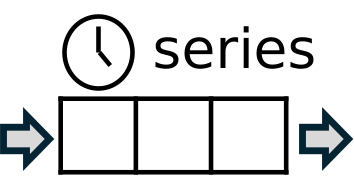 | Time-Series Window | Temporally scoped buffer | time-series-window.svg |
The SVG asset names should remain stable once the documentation starts using them across pages.
HIF
A HIF is shown as a rounded rectangle.
Use specific labels when the HIF role is known:
Text HIF
Instruction HIF
ActionRequest HIF
RobotState HIF
Semantic Cell
A Semantic Cell is shown as a larger rounded rectangle labeled with its cell type.
Examples:
HC
ST
SG
ES
HE
A cell should not be confused with an implementation component such as a ROS node, Python class, service, or container.
The cell represents semantic responsibility.
Policy
A Policy is shown as a checklist-like document icon.
Recommended asset:
static/img/hml/policy-check.svg
Use this icon for:
- thresholds
- constraints
- safety rules
- social laws
- synchronization policies
- escalation policies
- autonomy policies
- resource policies
- queue priority policies
Policies usually enter Semantic Cells from above.
λ — Semantic Operator
A Semantic Operator is shown as a clean lambda symbol:
λ
It should usually appear without a surrounding rectangle.
Use subscripts or labels when needed:
λsync
λintent
λsafety
λ₁ λ₂ λₙ
The operator represents an expert, model, heuristic, rule, policy function, or implementation binding.
Expert Icons
HML may use more specific expert icons when the implementation family matters.
Deterministic Code
Recommended asset:
static/img/hml/code-expert.svg
Use for:
- rule-based handlers
- deterministic parsers
- procedural logic
- handcrafted algorithms
Neural Network
Recommended asset:
static/img/hml/nn-expert.svg
Use for:
- classifiers
- perception models
- skeleton detectors
- emotion classifiers
- learned predictors
LLM
Recommended asset:
static/img/hml/llm-bubble.svg
Use for:
- language interpretation
- open-ended reasoning
- fallback explanation
- natural language generation
- social reasoning
Multimodal Model
Recommended asset:
static/img/hml/multimodal-expert.svg
Use for:
- VLMs
- multimodal LLMs
- vision-language referent resolution
- image + text reasoning
- audio-visual interaction reasoning
HRI_DB
HRI_DB is shown as a database cylinder.
Recommended asset:
static/img/hml/hri-db.svg
Use HRI_DB only for the persistent semantic world model of the robot.
Do not use the HRI_DB symbol for a cache unless the diagram explicitly labels it as a cache.
Semantic Cache
A Semantic Cache is shown as a smaller database or cache cylinder.
Recommended asset:
static/img/hml/semantic-cache.svg
Use Semantic Cache for reusable computation or interpretation.
Example:
"Where is Bob?" → query intent: where_is(Bob)
Do not treat a cache as the authoritative world model.
Semantic Object
A Semantic Object is a JSON-like structured object.
Recommended asset:
static/img/hml/semantic-object.svg
Suggested textual notation:
{:}
or:
{
  "key": "value"
}
Use this notation for:
- HIF properties
- policy parameters
- query results
- DB records
- task specifications
- validation results
Queue
A Queue is shown as a one-dimensional row of boxes.
Recommended asset:
static/img/hml/queue.svg
Use Queue for ordered waiting items:
- HIFs
- tasks
- requests
- actions
- social requests
Prioritized Queue
A Prioritized Queue is a queue governed by a priority policy.
Recommended asset:
static/img/hml/prioritized-queue.svg
Use for:
- prioritized task queues
- request queues
- proactivity queues
- safety-prioritized alerts
Pending Queue
A Pending Queue stores tasks or requests that cannot execute yet but should not be discarded.
Recommended asset:
static/img/hml/pending-queue.svg
Use for:
- missing information
- closed social window
- unavailable user
- pending permission
- unresolved ambiguity
- delayed task resumption
Pending queues should usually have expiration or decay policies.
Buffer
A Buffer is bounded temporary storage.
Recommended asset:
static/img/hml/buffer.svg
Use for:
- stream buffering
- synchronization buffers
- smoothing
- evidence accumulation
- short-term storage
Time-Series Window
A Time-Series Window is a buffer with explicit temporal meaning.
Recommended asset:
static/img/hml/time-series-window.svg
Use for:
- gesture learning
- gesture classification
- motion pattern detection
- engagement estimation
- temporal smoothing
- repeated behavior detection
Decision Diamond
A decision is shown as a diamond.
The diamond is not a primitive Semantic Cell.
It represents the branching output produced by a gate role.
Typical branches include:
pass / block
hit / miss
ready / pending
consistent / inconsistent
problem / no problem
safe / unsafe
Effect
An Effect represents an external, computational, communicative, or embodied action.
Examples:
- spoken sentence
- robot movement
- navigation command
- UI notification
- database-side action
- user-code execution
- emergency stop
Effects usually appear after a HIF Executor.
Visual Composition Rules
Left-to-Right HIF Flow
The main semantic flow should move from left to right.
Input HIF → Semantic Cell → Output HIF
Top-Down Policy and Expert Inputs
Policies and experts should enter Semantic Cells from above.
Policy      λ
  ↓         ↓
Semantic Cell
Independent Policy and Expert Inputs
Policy and expert inputs should be visually independent.
Do not draw:
Policy → λ → Cell
Prefer both entering vertically from above:
Policy      λ
  ↓         ↓
Semantic Cell
State as Side Input or Side Effect
Memory, cache, and queues should usually appear as side structures.
They may feed a Semantic Cell, receive updates from it, or trigger later reprocessing.
Decision Diamonds for Branching
Use a diamond when the diagram branches into outcomes.
Do not use a diamond merely to show normal sequential flow.
Unified HML Symbol Map
The following diagram summarizes the main visual symbols used by HML.
The unified map is intentionally compact. Individual diagrams may use larger or more specific versions of the same symbols.
Recommended SVG Asset List
The following files are expected under:
static/img/hml/
| File | Purpose |
|---|---|
policy-check.svg | Policy artifact |
code-expert.svg | Deterministic code / rule expert |
nn-expert.svg | Neural-network expert |
llm-bubble.svg | LLM expert |
multimodal-expert.svg | Multimodal / VLM expert |
hri-db.svg | HRI_DB persistent semantic world model |
semantic-cache.svg | Semantic cache |
semantic-object.svg | JSON-like semantic object |
queue.svg | Generic queue |
prioritized-queue.svg | Prioritized queue |
pending-queue.svg | Pending queue |
buffer.svg | Buffer |
time-series-window.svg | Time-series window |
Optional future assets:
| File | Purpose |
|---|---|
clock.svg | Expiration / waiting / timeout |
sensor.svg | Sensor or external source |
actuator.svg | Physical actuator |
world-effect.svg | External or embodied effect |
human.svg | Human entity |
robot.svg | Robot entity |
Design Guidelines
Prefer Shared SVG Assets
Use shared SVG assets instead of embedding one-off icons in each page.
This keeps diagrams visually consistent.
Keep SVGs Theme-Friendly
Where possible, SVGs should use:
currentColor
for strokes and fills.
This helps them work in both light mode and dark mode.
Avoid Private-Use Font Characters
Do not rely on private-use glyphs such as custom icon-font characters.
They may render incorrectly across browsers, operating systems, or build environments.
Use SVG assets instead.
Keep Diagrams Semantically Minimal
Only show symbols that matter for understanding the architecture.
Avoid decorative icons that do not carry modeling meaning.
Label Symbols Clearly
Even when using an icon, add a short label when the meaning may not be obvious.
Examples:
HRI_DB
Semantic Cache
Policy
Expert Stack
Pending Queue
Use Decision Diamonds Only for Branching
A decision diamond should indicate actual semantic branching, not ordinary sequential processing.
Keep Policy and Expert Inputs Independent
Do not visually imply that the policy is generated by the expert or that the expert owns the policy.
Both should enter the Semantic Cell independently.
Conclusion
The HML Visual Dictionary provides the shared notation used by HML diagrams.
It turns the framework from a collection of architecture sketches into a consistent modeling language.
By using stable symbols for HIFs, Semantic Cells, policies, experts, memory, queues, and decisions, HML diagrams become:
- easier to read
- easier to compare
- easier to maintain
- easier to teach
- easier to publish
- easier to implement consistently
This visual vocabulary should be used throughout the SOCIAL framework documentation and the HRI Design Patterns.